LaTeX input in Inkscape 0.46
July 21st 2008

I use Inkscape to do many of the drawings for my articles and talks, and have come across an irritating problem: I could not include LaTeX formulas on it. I have googled a bit about it, and the first match already led me to a bug report, where a comment by Kees Cook gives a fix that I quote below:

% cd /usr/share/inkscape/extensions
% curl -s 'http://launchpadlibrarian.net/12978623/eqtexsvg.py.patch' | sudo patch -p0

The bug affects (and the patch fixes) Inkscape 0.46 on Ubuntu Hardy Heron and Debian Lenny (that I know of).

Tags: , , , , , , , ,

No Comments yet »

LWD - July
July 15th 2008

After another boring month, I have little to write about, besides my LWD project data update. You can read this May 2008 post for an intro.

As usual D2D means “days to domination” (the expected time for Windows/Linux shares to cross, counting from Feb 3, 2008), and DD2D means difference (increase/decrease) in D2D, with respect to last report (around a month ago).

Project D2D DD2D Confidence %
Einstein 247.9 +62.8 30.4
MalariaControl 996.1 +166.2 15.7
POEM 478.5 - 8.6
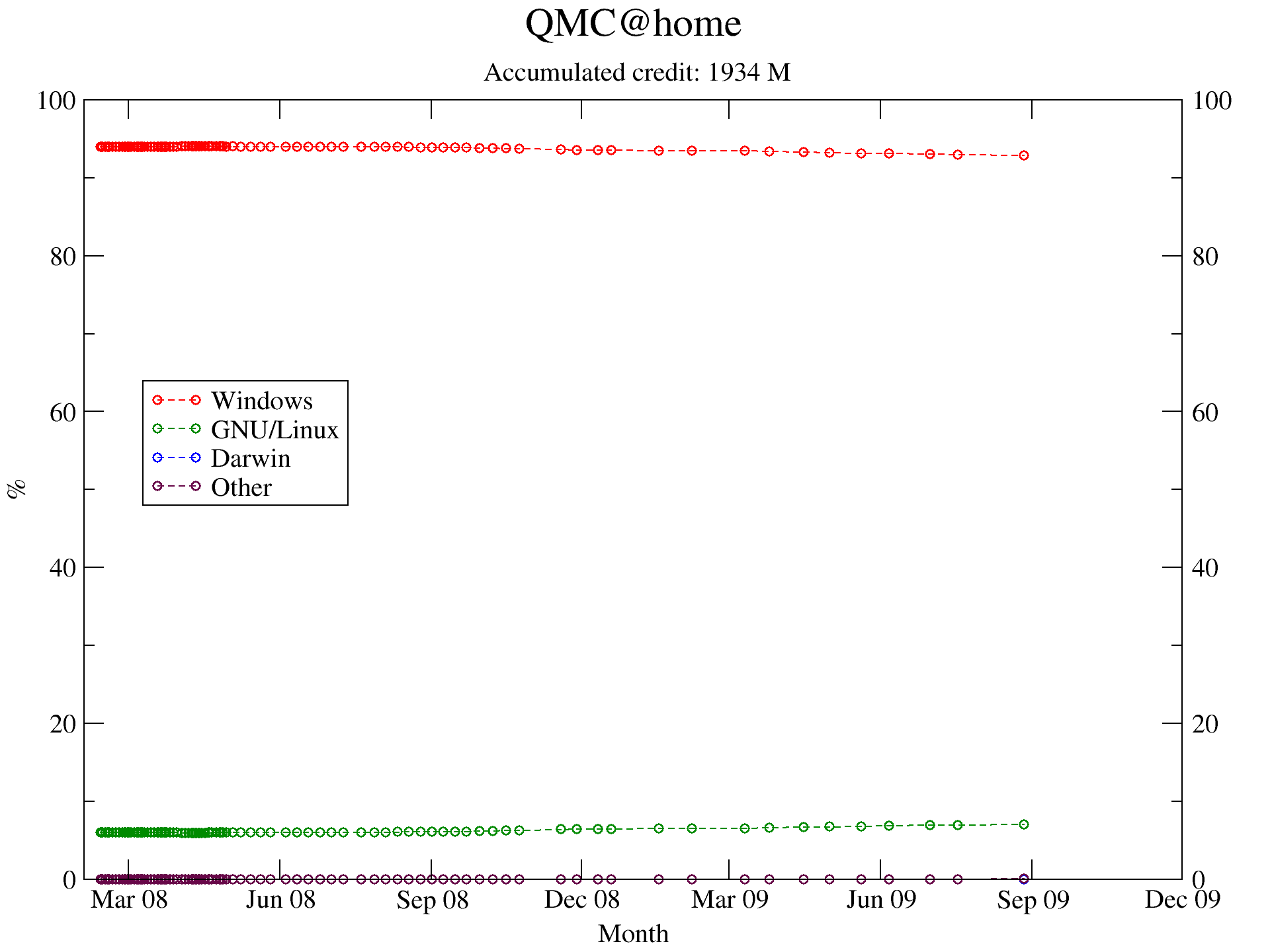
QMC 2516.7 +555.0 5.9
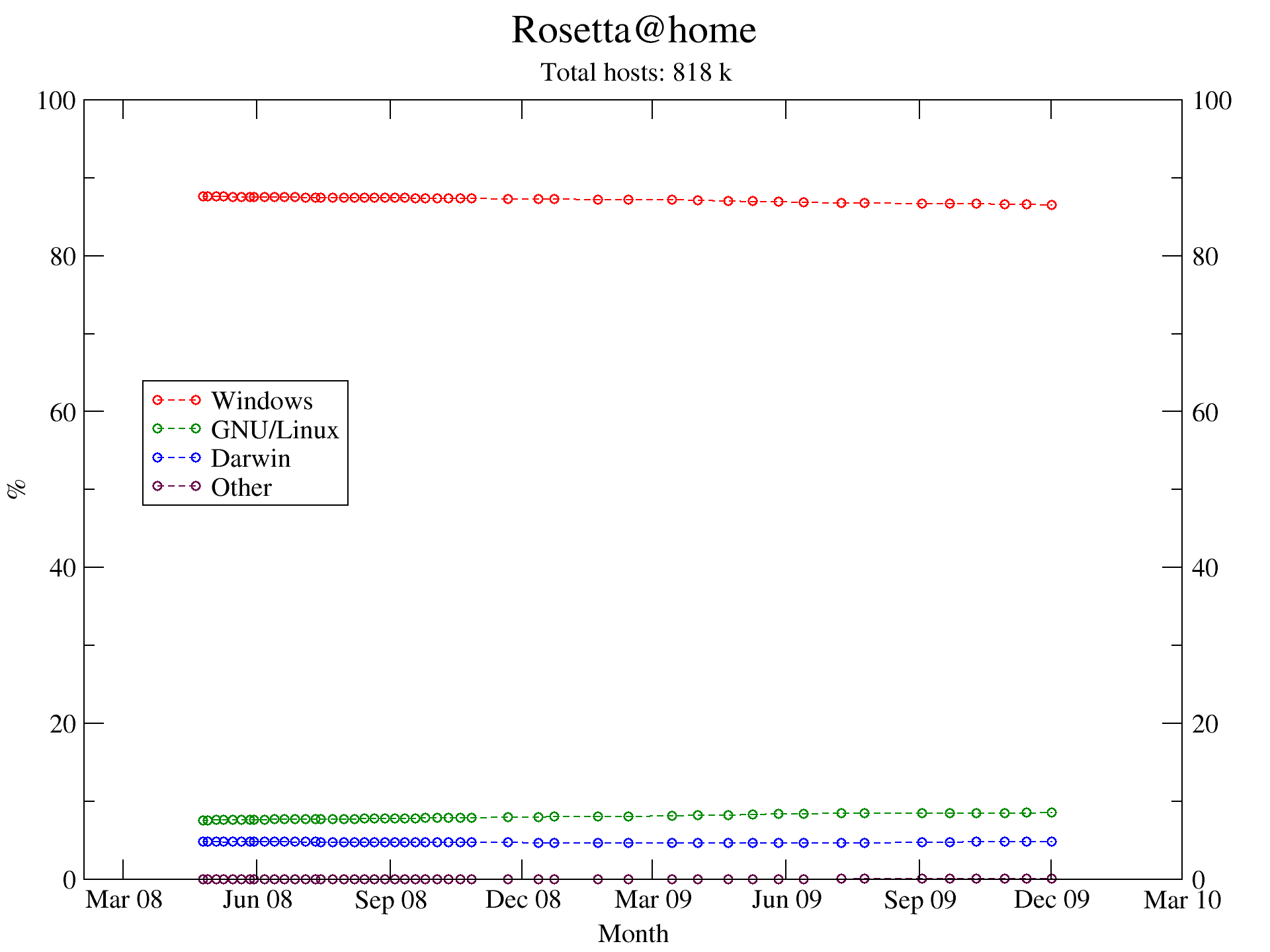
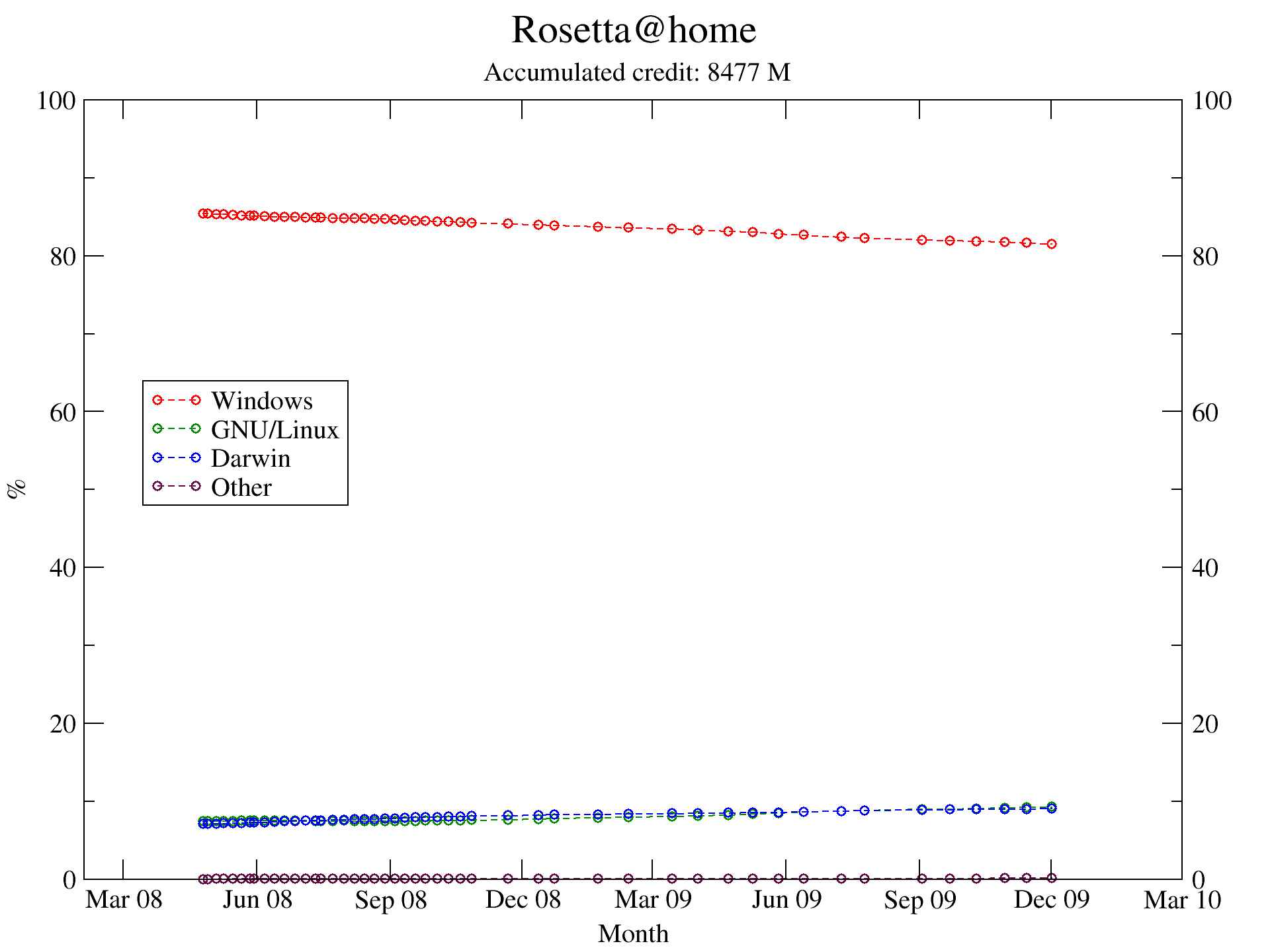
Rosetta 4457.5 +3155.8 1.8
SETI 3002.5 -1194.0 4.9
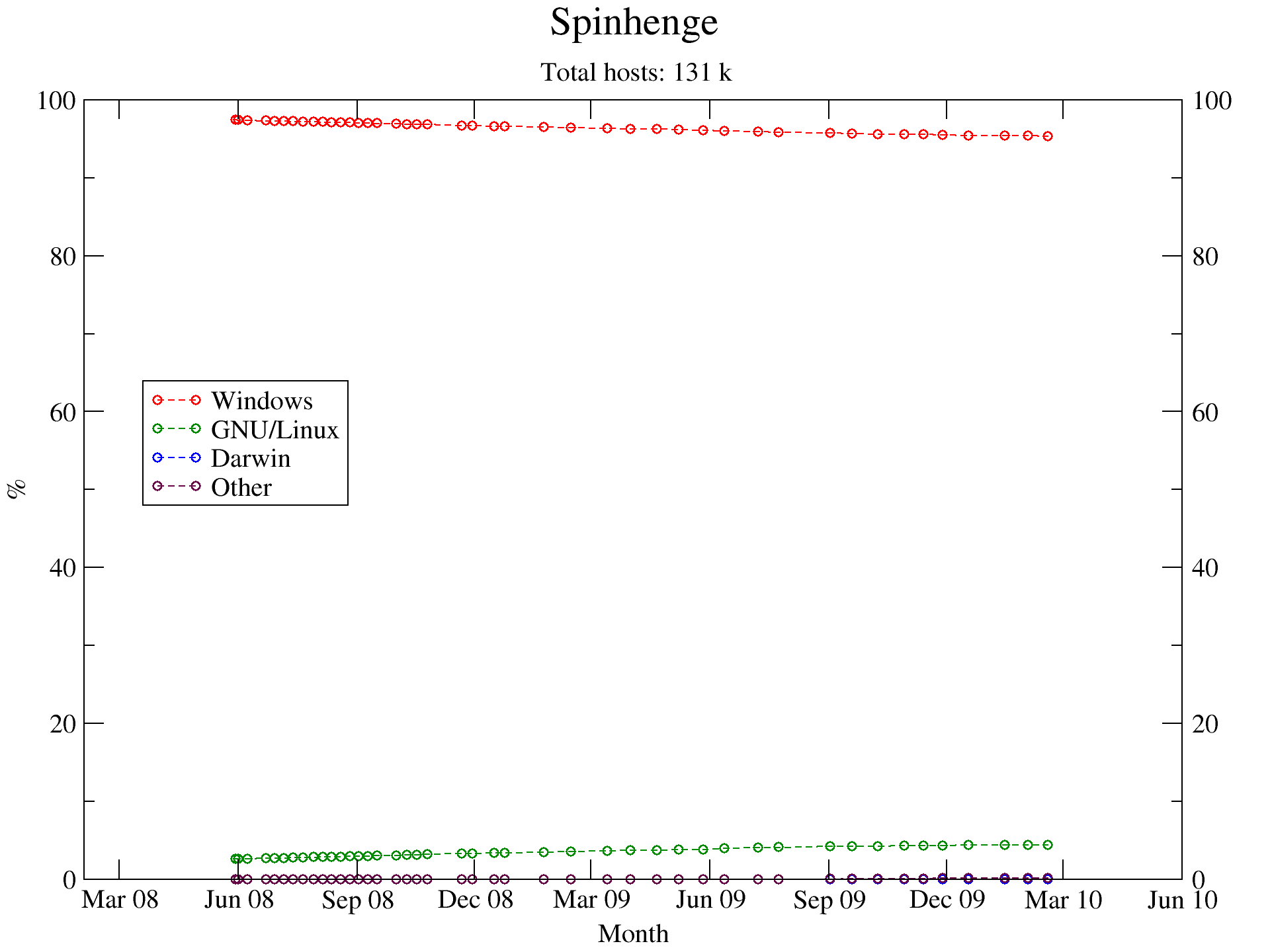
Spinhenge never - -

Except for SETI@home, all the D2Ds have gone up, showing that maybe the predictions so far were too optimistic. On the bright side (for FLOSS), SETI is, by far, the project with most users, so its results are the most reliable.

Recall that confidence percents are below 10%, except in two cases, which means logged data extent is small, compared to prediction time. This periodic report, thus, will get more and more accurate as months pass by.

Tags: , , , , , , ,

No Comments yet »

Making iSight camera work in Ubuntu
July 4th 2008

As I said in a previous post, I bought a MacBook, and I am making all bits work correctly. Out-of-the-box support from Ubuntu (the only GNU/Linux I tried on the MacBook so far) is excellent, but some things (camera, WiFi…) need proprietary drivers, so some more tweaks are needed.

I have followed the instructions in the Ubuntu community site, as with the procedures detailed in the previous post.

Basically, it all boils down to:

Fetch the Apple drivers for the camera

As root (if, unlike me, you like sudo, then run the following as user, but prepended with sudo), mount the Mac OSX partition (you didn’t delete it, right?) and copy the relevant file somewhere else (the cp command should be all in one line):

# cd
# mkdir /mnt/macosx
# mount /dev/sda2 /mnt/macosx
# cp /mnt/macosx/System/Library/Extensions/
     IOUSBFamily.kext/Contents/PlugIns/AppleUSBVideoSupport.kext/
     Contents/MacOS/AppleUSBVideoSupport .
# umount /mnt/macosx

You might have noticed that the Mac OSX partition is not sda1, but sda2. Don’t ask me. It turns out like this after following my own installation instructions. Apple must have decided to install the OS in the second partition for some reason.

Install the required packages

We need a package called isight-firmware-tools. Unfortunately it is not present in the Hardy repos at the moment (it was in the Gutsy ones, I think). You can add a Launchpad repo, editing /etc/apt/sources.list to add:

deb http://ppa.launchpad.net/mactel-support/ubuntu hardy main
deb-src http://ppa.launchpad.net/mactel-support/ubuntu hardy main

Then, as root:

# aptitude update
# aptitude install isight-firmware-tools

You will be prompted for a path to the driver you copied before. You can press Enter without paying much attention, then execute (assuming you copied the driver to your root home):

# cd
# ift-extract -a ./AppleUSBVideoSupport

To activate the driver, restart HAL:

# /etc/init.d/hal restart

Test it with Ekiga

As explained in the Ubuntu community site, you can run Ekiga as user (after installing the ekiga package). Choose V4L2 as video plugin, and Built-in iSight should appear among the Input device list. If it does, the process worked.

Tags: , , , , , , , , , ,

No Comments yet »

LWD update
June 15th 2008

This is a (in principle, monthly) update to my “Linux World Domination” project. You can read the intro in this May 2008 post.

The data presented is different from the one in the aforementioned post:

  • Mac is dropped from it
  • Predictor@home is also dropped
  • Two projects have been added: POEM and Spinhenge
  • D2D means “days to domination”. The expected time for Windows/Linux shares to cross, counting from Feb 3, 2008.
  • DD2D means difference (increase/decrease) in D2D, with respect to last report (a month ago)
Project D2D DD2D Confidence %
Einstein 185.1 - 21.8
MalariaControl 829.9 -1.1 15.5
POEM never - -
QMC 1961.7 +122.7 6.1
Rosetta 1301.7 - 3.8
SETI 4196.5 -370.5 2.9
Spinhenge - - -

Except for QMC@home, all the projects have reduced the D2D. Rosetta and Einstein were expected to never lead to LWD, and now they are.

See you next month!

Tags: , , , , , , , ,

No Comments yet »

Linux e-mail clients rant
June 2nd 2008

I am really disappointed at the MUA offer I am finding for by Debian box. I have tried KMail, Thunderbird, Evolution and Claws Mail, and all of them fail at some point. All four errors are different, and all of them almost total showstoppers.

Note: I access my e-mail through Gmail IMAP. I don’t really care if these MUAs are good at POP3 or whatever. I want good IMAP.

KMail 1.9.9

The GUI is nice, has all features I want, everything OK… It’s just that browsing the remote folders is hopelessly slow. I can brush my teeth in the time it takes to delete a message, and I don’t want to go into what I can do in the time it takes to move a message from one folder to another one.

Apparently this could be fixed in KMail2, which will come with KDE4. The problem is that I want it fixed now.

Thunderbird 2.0.0.14

This one is also very good in general. Actually, its problem is not due to itself. Its probably due to some bad interaction with X.org or something: everything works fine, but starting up and subsequent rendering/deleting of the window itself is really slow. If I minimize and maximize it back, it takes ages to reappear. I have this problem with TB and Firefox (actually Icedove and Iceweasel in Debian), and with no other program.

Evolution 2.22

Again, almost everything is fine. Almost. The single problem is that if the “To” and/or “From” fields in the message list contain non-ASCII characters, they appear garbled. Nowhere else does this happen. Even other fields, such as “Subject” can contain accents or ñ with no problem, as can the text body.

This would be a cosmetic issue I could live with, but there are two problems I can not tolerate: I do not want these errors to appear in the messages I send when replying to garbled messages, and more importantly, I have sometimes had recipient lists containing non-ASCII characters mangled. I don’t want to click “Reply all” and end up sending the message to only 3 of the 10 recipients.

This problem will supposedly be fixed in version 2.23.

Claws-mail 3.4.0

Again and again, almost everthing is right. Now messages can contain non-ASCII chars anywhere, browsing folders is fast, manipulating/drawing/erasing the program window is fast… BUT, replying to a message, regardless of the settings one chooses, does not include the original message quoted. This seems a minor error. It isn’t.

The thing that bugs me most is that I can not understand how these problems happen with free software packages. If you take KMail, Evolution and Claws, each one has a single error that the other two have already fixed… Couldn’t they just copy each other? That is precisely the whole point of free software.

Couldn’t KMail browse/scan/manipulate the IMAP folders with the efficient method Evolution and/or Claws use?

Couldn’t Evolution display the message fields with the error-free method KMail and Claws use?

Couldn’t Claws quote the original message as anyone else in the Universe does?

If only the three errors where not spread among the three MUAs, there would be one that I could use!

Tags: , , , , , , , ,

14 Comments »

How much left for GNU/Linux World domination?
May 11th 2008

Remember Project BHS? It is an effort I am making to log the evolution of Windows/Linux/Mac/Other market share, via the respective contributions to BOINC projects.

I have taken a further (and very crude) step towards the estimation of when will the Beast from Redmond fall, by extrapolating the “Number of hosts vs. time” curves to the points of crossing. For that I have fitted the data so far to (very crude, I know) second order polynomials (with Xmgrace), and calculated the crossing points (with GNU Octave).

The results can be:

  1. Windows seems to go upwards and Linux/Mac downwards (will never cross)
  2. The crossing point is above 100% or below 0% market share: the extrapolation is unfit (will never cross)
  3. There is a crossing point and lies within 0-100% market share: that’s the World Domintion date!!

I will be posting data for different projects, along with a “confidence” percent. This value corresponds to the fraction of the total time required for Linux/Mac to overcome Windows (according to the present tendency) that is represented in the collected data. If 10-day data suggests that Linux will overcome Windows in 1000 days, then the result is not really very trustable. OTOH, 999-day data suggesting the same is compelling.

An important notice: expected times are not measured from “now”, but from the moment I started collecting data, on Feb 3, 2008 (3 months ago).

The following table illustrates the aforementioned data for some selected projects, with time in days and confidence percent in parenthesis.

Project Linux (%) Mac (%)
Rosetta never never
MalariaControl 831 (11.4) 1142 (8.3)
SETI 4579 (1.9) 3094 (2.8)
Einstein never never
QMC 1839 (4.64) -
Predictor 1095 (1.03) never

As an example, the curve fits and corresponding crossing points are given in the following figure, for the case of SETI@Home. You can infer the limited trustability of the predictions from the tiny time extent of the data points used to extrapolate the curves. As time goes by, curves will be more and more trustable, so expect updates to this “project”.

seti_small

SETI@Home data (click to enlarge)

The software used to process the data is BHS, and can be found at my home page.

Tags: , , , , , , ,

2 Comments »

Inkscape tip: make arrow head’s color match that of its body
July 16th 2007

I have encountered the problem more than once, and it is a bit annoying to say the least. Basically, when you build a path/arrow in Inkscape, it starts as a black curve by default. You can edit it to put a marker in either or both ends (Click on the curve, then Object->Fill and Stroke->Stroke Style), to make an arrow, for example.

Now, the problem is that if you change the color of the body of the arrow, the head will remain black, as documented, for example, in A Guide to Inkscape, by Tavmjong Bah. Not nice, uh? The solution is given in the same site, and consists on using a plugin. To do so, select: Effects->Modify Path->Color Markers to Match Stroke.

If you are a Debian user, you might encounter a problem: a window pops up saying The inkex.py module requires PyXML. This has been reported as a bug, and also happens for Ubuntu. The solution is to install the python-xml package, which is not always installed by default when you install Inkscape, it is just “suggested”. This means that when you install Inkscape (aptitude install inkscape), aptitude will tell you something like “The package python-xml is recommended, but it is not going to be installed”, and will go on happily. If (like me) you ignore the suggestion, you will not have the python-xml package installed, and some extensions, like the above, will not work (however this allows the users that do not want to use the plugins to have a lighter instalation, if they so wish).

Tags: , , , , , , ,

6 Comments »